Compare HRPlus4 Standard (Free) and Advanced ($49)
HRPlus4 is employee records software for Windows, built for small and growing businesses. Both editions give you a complete employee database with dependent and contact information, birthdate tracking, full employee history, an attendance module, comprehensive HR reports, a built-in non-biased discipline points system and automatic EEO (Equal Employment Opportunity) data compilation.
HRPlus4 Standard is free forever with no upcharges. HRPlus4 Advanced is a one-time $49.00 and adds an employee benefits module plus enhanced 256-bit encryption with anti-tamper protection. Your data is stored locally, so there are no monthly cloud fees and no per-employee charges. HRPlus4 runs on Windows 10 and Windows 11.

Comprehensive Employee Data
Comprehensive Employee Data
Dependent and Contact Info / Birthdate Tracking
Dependent and Contact Info / Birthdate Tracking
Exclusive Built-In Non-Biased Discipline System
Exclusive Built-In Non-Biased Discipline System
Auto-Compile EEO Data
Auto-Compile EEO Data
Complete Employee History
Complete Employee History
Attendance Module
Attendance Module
Comprehensive Reporting
Comprehensive Reporting
Standard Password Security
Enhanced 256-Bit Encryption and Anti-Tamper
Not included
Employee Benefits Module
No Cost
Low cost of $49.00
What the HRPlus4 HR Software Features Do
Employee records and employee database
Keep every employee's information in one place instead of scattered spreadsheets and paper files. Store comprehensive employee data, dependents and emergency contacts, and track birthdates so milestones are never missed. A complete employee history keeps the full record of each person from hire forward.
Built-in non-biased discipline points system
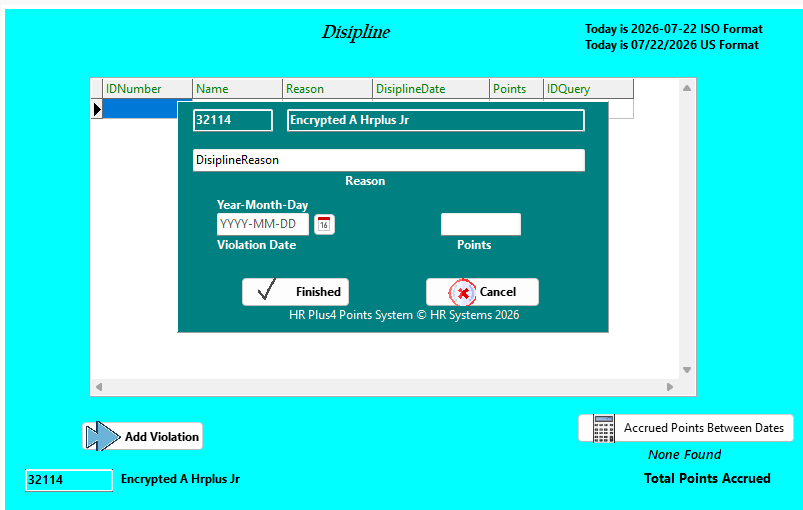
The exclusive discipline system gives managers a consistent, documented way to record employee discipline, helping you treat similar situations the same way and keep clear records if questions come up later. For each violation you enter the reason, the violation date and the points, and HRPlus4 totals the accrued points between any two dates.
Automatic EEO data compilation
HRPlus4 compiles Equal Employment Opportunity (EEO) data directly from your employee records, saving the manual counting and re-keying that EEO reporting usually requires.
Attendance tracking
The attendance module records employee attendance alongside the rest of each employee's record, so absences and time off are tracked in the same system as everything else.
HR reports
Comprehensive reporting lets you pull the information you need from your employee records for management reviews, audits and day-to-day HR decisions.
Employee benefits module (Advanced)
HRPlus4 Advanced adds a benefits module for tracking employee benefits as part of the same employee record.
256-bit encryption and anti-tamper protection (Advanced)
Advanced upgrades the standard password security with enhanced 256-bit encryption and anti-tamper protection to help keep sensitive employee information safe.
Why Choose HRPlus4 Over Subscription HR Software
Most HR software charges per employee every month and stores your records on someone else's servers. HRPlus4 is different: the Standard edition is free with no upcharges, the Advanced edition is a single one-time $49.00 payment, your data stays stored locally rather than in the cloud, and you do not have to buy a payroll package to use it. See how it stacks up on our HR software comparison page.
System Requirements
HRPlus4 is Windows HR software, tested on Windows 10 and Windows 11. Because your employee data is stored locally, there is no cloud account to set up and no internet connection is needed to use your records.
HRPlus4 Features FAQ
Is HRPlus4 HR software really free?
Yes. HRPlus4 Standard is free forever with no upcharges and no per-employee fees. HRPlus4 Advanced is a one-time cost of $49.00.
What is the difference between HRPlus4 Standard and Advanced?
Both editions include employee records, attendance, EEO data compilation, the built-in discipline system and reporting. Advanced adds the employee benefits module and enhanced 256-bit encryption with anti-tamper protection, and costs a one-time $49.00.
Does HRPlus4 store employee data in the cloud?
No. HRPlus4 keeps your employee data stored locally, so it is not sent to the cloud, and there are no monthly cloud fees.
Can HRPlus4 help with EEO reporting?
Yes. HRPlus4 automatically compiles Equal Employment Opportunity (EEO) data from your employee records in both the Standard and Advanced editions.
Do I need to buy a payroll package to use HRPlus4?
No. HRPlus4 is stand-alone HR software, and you do not have to purchase a payroll package to use it.
What operating system does HRPlus4 run on?
HRPlus4 is Windows HR software and has been tested on Windows 10 and Windows 11.
How does the HRPlus4 discipline points system work?
For each violation you record the employee, the reason, the violation date and the points. HRPlus4 can then show the accrued points between any two dates, so every employee is measured the same way.
Ready to choose? See the HRPlus4 price table, browse the photo gallery of the software, see how HRPlus4 compares with BambooHR and OrangeHRM, read the about page, or contact us with questions.